Two people can share a small desk successfully when the handoff is clear. Problems begin when the first person's notebook remains on the surface, the second person's keyboard has no storage destination and neither remembers the chair adjustment. More desktop organizers can make that crowded negotiation permanent.
Create one personal kit for each user and a short reset sequence for the shared equipment. Measure both the working position and the parked kit. This guide assumes users work at different times; if they need the desk simultaneously, the problem is capacity rather than a handoff routine.
Fit each user before measuring the stored kit
Set up the first user's chair, keyboard and screen, then have the second user establish their own arrangement. Note the intended adjustment controls and the settings that work. OSHA — Computer Workstations: Chairs highlights the value of adjustment for multiple users. Do not assume one chair height serves both people because both can reach the tabletop.
Check that adjustments are straightforward and within the equipment's intended use. A monitor that requires awkward lifting for every handoff may be unsuitable for frequent sharing. Keep equipment stable throughout and avoid improvised supports used merely to save resetting time.
Use OSHA — Computer Workstations: Good Working Positions as a reference for supported feet and relaxed working positions. If one user needs a footrest, give it a storage position that does not obstruct the other person's legs. A shared desk is not fully reset when its visible surface is clear but the previous user's equipment remains under the next person's feet.
Measure the whole parked kit
Choose a suitable container only after assembling the actual kit. Include the laptop sleeve, keyboard, pointing device, notebook and charger in their intended stored positions. Keep heavy or delicate equipment supported, and follow device instructions about cooling and storage after use.
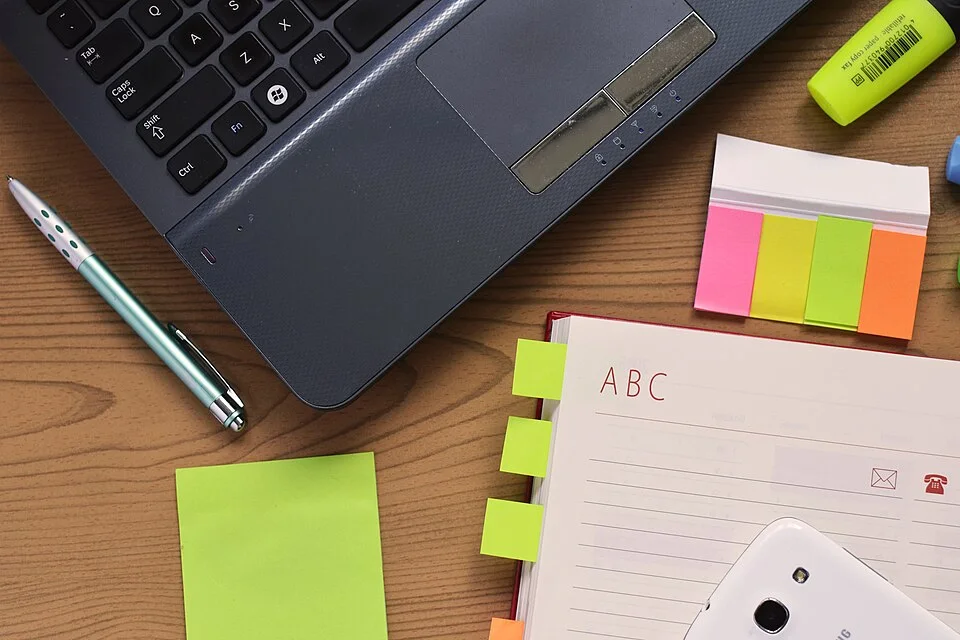
The notebook’s index tabs project beyond its cover, while the pen, phone and loose stationery occupy separate positions beside the laptop. Gather your actual portable items with their sleeve and leads before choosing a carrier. Include those projections and the carrier’s outer dimensions in the stored-kit measurement rather than sizing storage from the laptop alone.
Photo & usage
www.Pixel.la Free Stock Photos · CC0 · Source. Display copies resized and encoded as WebP; no instructional details were fabricated or removed.
Measure the container externally and the storage opening internally. Allow room to grip and remove it. A tray that fits tightly on a shelf can be difficult to lift when loaded, particularly if it has no useful handles. Try one loaded kit before purchasing a matched pair.
Avoid storing loose leads so that connectors catch as the tray comes out. Gather them without sharp bending or strain, following equipment guidance. Label the kit clearly enough that another person can return it to the correct location. A beautiful unmarked stack of identical cases can create unnecessary searching at every changeover.
Compare an illustrative reset sequence
This example is illustrative and uses invented timing, not measured performance. One handoff involves collecting papers for 45 seconds, disconnecting personal devices for 30 seconds, parking the kit for 25 seconds and adjusting shared equipment for 40 seconds. The total is 45 + 30 + 25 + 40 = 140 seconds, or 2 minutes 20 seconds.
An alternative leaves papers in an assigned folder and uses a nearby kit shelf. In the invented comparison, collecting papers takes 15 seconds, disconnection remains 30 seconds, parking takes 15 seconds and adjustment remains 40 seconds. The total is 100 seconds, or 1 minute 40 seconds. The difference is 40 seconds per handoff.
Do not use those figures as a promised saving. Time your own sequence only if useful, and record interruptions separately. The example shows that reducing searching and travel may matter more than buying another desktop accessory. It also preserves adjustment time rather than treating correct setup as an inconvenience to eliminate.
Keep the working surface distinct from the waiting kit
The next user's kit should wait in its assigned storage, not at the back of the active desk. A parked laptop or tray can reduce the space available for the current user's pointer and papers. OSHA — Computer Workstations: Desks identifies crowding as a cause of poor equipment placement; keep the active task area available to the person working.
Check where shared peripherals sit during different tasks. A reference sheet may need a clear area that a shared headset occupies during calls. Define a safe resting position for that equipment within the desk arrangement, without burying controls or obstructing ventilation.
If one person's work regularly exceeds the surface, address that task specifically. A large paper project may need another temporary surface with an agreed clear-away routine. It is not reasonable to solve it by permanently occupying the second person's storage shelf. Keep the ownership of destinations clear even when work materials temporarily expand.
Write a reset that another person can recognize
Use explicit actions: save work, close the personal folder, disconnect the personal device as instructed, return the kit, restore the clear input area and leave shared equipment ready for adjustment. Keep the sequence short enough to follow at an ordinary stopping point.
Do not require the first user to guess the second person's preferred settings. Leave the equipment accessible and record each person's own reference settings. The arriving user can make their intended adjustments. This avoids treating a rushed approximate reset as evidence that the workstation is ready for anyone.
Agree what happens when work ends unexpectedly. A folder or suitable case for unfinished papers can preserve order without leaving the entire desk occupied. Establish a realistic deadline for removing that temporary kit if needed. The arrangement should tolerate an interrupted session, not depend on perfect behavior every evening.
Check the handoff when a session ends unexpectedly
Choose a suitable folder or carrier for unfinished papers before the first interrupted session occurs. Give it a destination within the personal kit allocation and keep its label understandable. The next user should not have to decide which loose sheet can be moved or whether a private document may be read.
Rehearse the interrupted handoff without rushing: save work, protect the active materials and restore the shared input area. If the unfinished kit needs more room than its assigned destination, resolve that capacity mismatch rather than leaving it permanently on the desk. A shared surface remains workable when ordinary interruptions have a clear pause method as well as a normal shutdown routine.
Confirm the handoff over several normal changes
Run both directions of the handoff. One person's compact kit may park easily while the other's wider keyboard catches the storage opening. Check the actual loaded containers and both adjustment sequences. A single successful demonstration by the tidier or more experienced user is insufficient evidence for the shared routine.
Record recurring failures in plain terms: unidentified charger, heavy tray, missing paper folder or footrest left in the leg area. Correct the cause and repeat the affected movement. Avoid adding new containers until each existing one has a clear purpose and a suitable destination.
Completion means either person can begin work without sorting the other's belongings, and both can restore the room when finished. Keep the agreed kit inventories and adjustment notes nearby. Revisit the system when equipment changes, since a wider keyboard or larger laptop can invalidate an otherwise reliable small-space handoff.
THE REFERENCE FILE
Sources & scope
Documentation reviewed 1 Nov 2026. Examples are illustrative; this article does not claim hands-on product testing. Follow the instructions for your actual material, model and location.


.jpg)